This website is managed by Ultima Markets’ international entities, and it’s important to emphasise that they are not subject to regulation by the FCA in the UK. Therefore, you must understand that you will not have the FCA’s protection when investing through this website – for example:
You will not be guaranteed Negative Balance Protection
You will not be protected by FCA’s leverage restrictions
You will not have the right to settle disputes via the Financial Ombudsman Service (FOS)
You will not be protected by Financial Services Compensation Scheme (FSCS)
Any monies deposited will not be afforded the protection required under the FCA Client Assets Sourcebook. The level of protection for your funds will be determined by the regulations of the relevant local regulator.
Note: UK clients are kindly invited to visit https://www.ultima-markets.co.uk/. Ultima Markets UK expects to begin onboarding UK clients in accordance with FCA regulatory requirements in 2026.
If you would like to proceed and visit this website, you acknowledge and confirm the following:
1.The website is owned by Ultima Markets’ international entities and not by Ultima Markets UK Ltd, which is regulated by the FCA.
2.Ultima Markets Limited, or any of the Ultima Markets international entities, are neither based in the UK nor licensed by the FCA.
3.You are accessing the website at your own initiative and have not been solicited by Ultima Markets Limited in any way.
4.Investing through this website does not grant you the protections provided by the FCA.
5.Should you choose to invest through this website or with any of the international Ultima Markets entities, you will be subject to the rules and regulations of the relevant international regulatory authorities, not the FCA.
Ultima Markets wants to make it clear that we are duly licensed and authorised to offer the services and financial derivative products listed on our website. Individuals accessing this website and registering a trading account do so entirely of their own volition and without prior solicitation.
By confirming your decision to proceed with entering the website, you hereby affirm that this decision was solely initiated by you, and no solicitation has been made by any Ultima Markets entity.
Ultima Markets does not have an establishment in Singapore and does not operate from Singapore.
Ultima Markets does not provide products or services to citizens or residents of Singapore, and account applications from Singapore citizens or residents will not be accepted.
If you are a citizen or resident of Singapore, please do not open an account or use Ultima Markets’ products or services.
By selecting “Acknowledge and Continue Browsing”, you confirm that you are accessing this website on your own initiative and that your access is not the result of any direct marketing, targeted advertising, solicitation, or promotional activity by Ultima Markets.
Nothing on this website constitutes an offer, solicitation, or promotion of products or services in any jurisdiction where such activity is prohibited. You are responsible for ensuring that your access to and use of this website complies with applicable local laws and regulations.
Learn how to use the spread indicator in MT4 & MT5 to monitor live spreads, reduce trading costs, and time your entries more effectively.
What Is a Spread in Forex
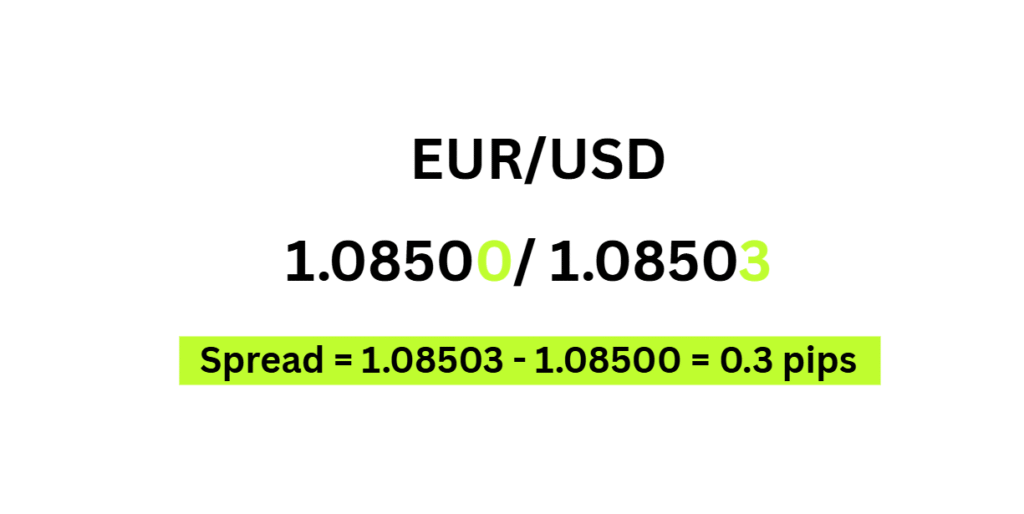
The spread is the difference between the bid price (sell) and the ask price (buy) of a currency pair, measured in pips. It’s your direct cost of entering a trade. For example, if EUR/USD shows 1.08500 / 1.08503, the spread is 0.3 pips.
When you open a trade, you immediately start at a small “loss” equal to the spread because you bought at the ask price but would only sell at the lower bid price. To break even, the market needs to move in your favor by at least the size of the spread.
This is why understanding the spread is so critical, it is your first and most immediate cost of trading.
Bid Price: the price at which the market (or your broker) will buy the base currency from you. This is the price you get when you sell.
Ask Price: the price at which the market will sell the base currency to you. This is the price you pay when you buy.
How to Use the Spread Indicator in MT4
The spread indicator in MT4 displays the live bid/ask difference directly on your chart, so you can monitor your trading costs tick by tick before committing to any position.
Installing the Indicator
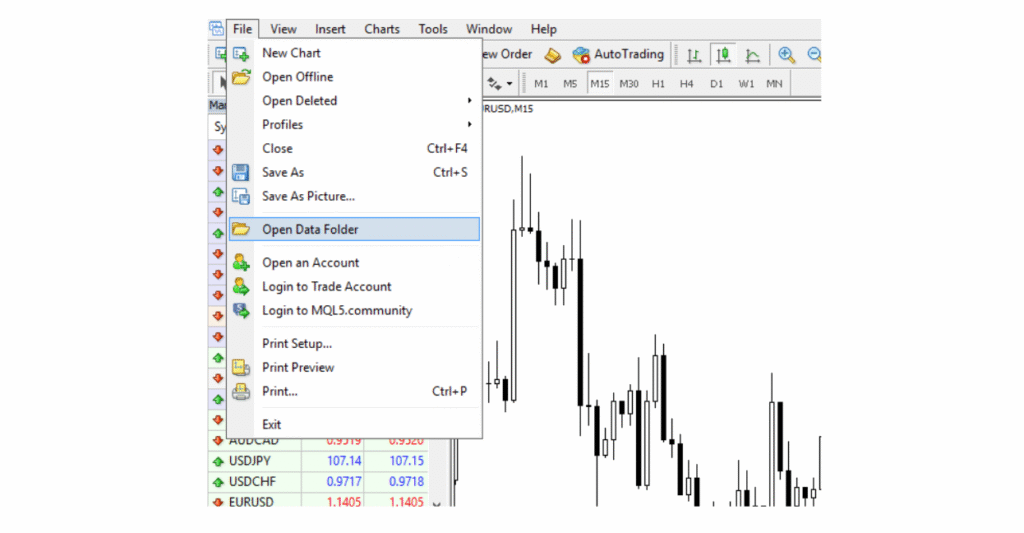
Download a .ex4 spread indicator file from your broker’s resource library or a trusted trading site. Open MT4, go to File → Open Data Folder → MQL4 → Indicators, paste the file in, then restart the platform.
Applying It to Your Chart
Open the Navigator panel, expand the Indicators section, locate the spread indicator, and drag it onto your chart. A settings window will appear where you can adjust the display color, font size, and on-screen position. Click OK and the live spread value will appear on your chart, updating in real time.
Reading the Values
The indicator displays a number in pips. During normal London or New York session hours on major pairs like EUR/USD, you should see spreads between 0.1 – 1.5 pips. If the number spikes above 3.0 pips, it typically signals a news event or low liquidity window, a signal to hold off on entering a trade.
Best Practices
Place the indicator in a corner that doesn’t obstruct your price action, top-right or bottom-left works well. Pair it with a session indicator to quickly identify the lowest-spread trading windows throughout the day.
How to Use the Spread Indicator in MT5
MT5 offers more built-in spread visibility than MT4, giving traders two ways to monitor live spreads, directly in the platform without needing a custom indicator.
Method 1: Market Watch Spread Column
Right-click any symbol in the Market Watch panel → Columns → Spread. This adds a live spread column across all your instruments at once, ideal for quickly comparing costs before deciding which pair to trade.
Method 2: Custom Indicator on Chart
For traders who want the spread visible directly on their chart, download a .ex5 spread indicator file, go to File → Open Data Folder → MQL5 → Indicators, paste the file in, and restart MT5. Then open the Navigator panel, find the indicator, and drag it onto your chart. The live spread value will appear and update tick by tick.
Reading the Values
Just like MT4, the number displayed is in pips. On major pairs during peak session hours, a spread of 0.1 – 1.5 pips is considered healthy. A sudden spike above 3.0 pips typically points to a news release, market open, or low-liquidity period, all situations where it’s worth waiting before entering.
Why MT5 Has an Edge
MT5’s built-in spread column means you can monitor spreads across multiple instruments simultaneously without installing anything extra, a clear advantage for traders who switch between forex pairs, indices, and commodities throughout the session.
How Is the Forex Spread Measured?
The spread is almost always measured in pips. A pip (percentage in point) is typically the fourth decimal place of a currency pair’s price.
Currency Pair
Bid
Ask
Spread
EUR/USD
1.08500
1.08503
0.3 pips
GBP/USD
1.27200
1.27208
0.8 pips
USD/JPY
149.500
149.510
1.0 pip
USD/TRY
32.100
32.160
6.0 pips
As you can see, major currency pairs like EUR/USD and GBP/USD tend to have very tight spreads due to high liquidity, while exotic pairs like USD/TRY carry significantly wider spreads.
What Affects the Size of the Forex Spread?
The spread is never fixed to a single value, it moves constantly based on real market conditions. Here are the key factors that determine how wide or tight a spread is at any given moment.
Market Liquidity
The more buyers and sellers active in the market, the tighter the spread. This is why the EUR/USD, the world’s most traded currency pair, consistently carries one of the lowest spreads available. Less popular exotic pairs have far fewer participants, resulting in wider spreads.
Trading Sessions
Forex operates 24 hours a day across four major sessions: Sydney, Tokyo, London, and New York. Spreads are generally tightest during the London and New York sessions, particularly during the overlap (8 AM – 12 PM EST), when global trading volume peaks. Conversely, spreads tend to widen during off-peak hours, such as the late New York session or early Asian session, when fewer participants are active.
Market Volatility & News Events
Major economic announcements such as Non-Farm Payrolls (NFP), inflation data (CPI), or central bank interest rate decisions, cause sudden spikes in volatility. During these periods, spreads can widen dramatically, sometimes 5 to 10 times their normal size, within seconds.
Broker Type & Business Model
Your broker’s pricing model plays a significant role:
Market Makers set their own bid/ask prices and profit directly from the spread.
ECN/STP Brokers pass interbank spreads to clients and charge a small commission instead.
Spread Cost Calculator
Want to calculate exactly how much a spread costs you in real money?
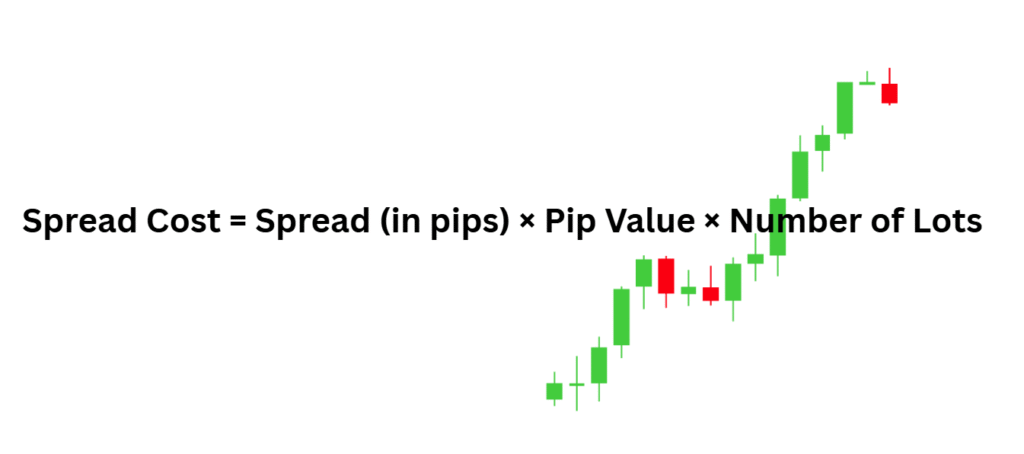
Use this simple formula: Spread Cost = Spread (in pips) × Pip Value × Number of Lots
Example:
EUR/USD spread: 0.5 pips
Pip value (1 standard lot): $10
Trade size: 1 lot
Cost = 0.5 × $10 × 1 = $5.00 per trade
On a mini lot (0.1 lot), that same trade would cost just $0.50. This is why position sizing matters and why traders on smaller accounts benefit from choosing brokers with the tightest possible spreads.
Fixed vs. Variable Spread: Which Is Better?
Fixed spread is better for beginners. It stays constant regardless of market conditions, no surprise spikes during news events, no fluctuating costs, just predictable pricing on every trade. Ideal if you’re still building your strategy and want full control over your trading costs.
Variable spread is better for experienced traders. It moves with the market dropping as low as 0.0 pips during peak liquidity hours, but widening sharply during major news events. Scalpers and day traders who know how to time the market can benefit most from these tight windows.
Feature
Fixed Spread
Variable Spread
Consistency
Always the same
Changes with market
Cost during calm markets
Slightly higher
Can be very tight
Cost during news events
Stays fixed
Can spike sharply
Best for
Beginners, news traders
Scalpers, experienced traders
Conclusion
Understanding the spread is not just a beginner’s lesson, it’s a fundamental part of trading smart at every level. From knowing the difference between bid and ask, to reading a live spread indicator on your chart, every pip you save on trading costs is a pip that stays in your account.
Whether you’re scalping tight setups on EUR/USD or swing trading across multiple instruments, keeping a close eye on your spread helps you enter at the right time, avoid unnecessary costs, and make more informed decisions on every single trade.
Start monitoring your spreads in real time with Ultima Markets. Trade on MT5 with tight, transparent spreads across hundreds of forex pairs and CFD instruments, exactly the conditions you need to execute your strategy with confidence. Open a Live Account with Ultima Markets Today.
FAQs
Does MT5 have spreads?
Yes. Every instrument on MT5 has a spread, the difference between the bid and ask price. You can view it live in the Market Watch column or via a spread indicator on your chart.
How do you show spread in MT4?
Add a custom spread indicator (.ex4 file) via File, Open Data Folder, MQL4, Indicators, restart MT4, then drag the indicator onto your chart from the Navigator panel.
How to check spread on MT5?
Right-click any symbol in Market Watch, Columns, Spread to display the live spread column. You can also apply a custom spread indicator directly onto your chart for real-time monitoring.
Share Now
Disclaimer:This content is provided for informational purposes only and does not constitute, and should not be construed as, financial, investment, or other professional advice. No statement or opinion contained herein should be considered a recommendation by Ultima Markets or the author regarding any specific investment product, strategy, or transaction. Readers are advised not to rely solely on this material when making investment decisions and should seek independent advice where appropriate.
Thank you for visiting the Ultima Markets website. Please note that this website is intended for individuals residing in jurisdictions where access is permitted by law. Ultima and its affiliated entities do not operate in your home jurisdiction.
By clicking ‘Acknowledge’, you confirm that you are entering this website solely on your own initiative and not as a result of any specific marketing outreach. You wish to obtain information from this website based on reverse solicitation principles, in accordance with the applicable laws of your home jurisdiction.